“Loop engineering” is process automation with agents
TL;DR
“Loop engineering” brings a shift beyond prompting agents one turn at a time, but behind the new term, there seem to be simple and familiar process automation principles at play. I think of “loop engineering” simply as process automation with agents. A loop is just a scheduled task trigger, and a skill is just reusable instructions to perform a task.
Making sense of “loop engineering”
The rapidly evolving ideas and terminology around “loop engineering” can be tricky to follow.
“I don’t prompt Claude anymore. I have loops that are running. They’re the ones that are prompting Claude and figuring out what to do. My job is to write loops,” says Boris Cherny, the creator of Claude Code (which has a /loop scheduling feature). Boris describes a real shift beyond manual prompting: systems can now discover work, invoke agents, check outcomes, and continue directing the work without someone initiating every turn.
Addy Osmani describes the practice of what Boris calls “writing loops” as “loop engineering”. Addy breaks that system into automations, worktrees, skills, plugins and connectors, sub-agents, and memory.
A process automation lens
All of this can seem new and confusing at first. The exciting part is that we can cut through that by viewing these new capabilities through familiar ideas from process and workflow automation in organisations:
- Which process tasks do we want to automate?
- What should trigger each process task?
From that perspective:
- A “loop” is a scheduled trigger for a task in a process.
- A “skill” contains reusable task instructions.
- “Loop engineering” is simply process automation.
The ideas behind process automation are not new. What is new is the way it is implemented: using agent development harnesses such as Claude Code, Codex, Cursor, and OpenCode, together with a variety of new practices.
Examples
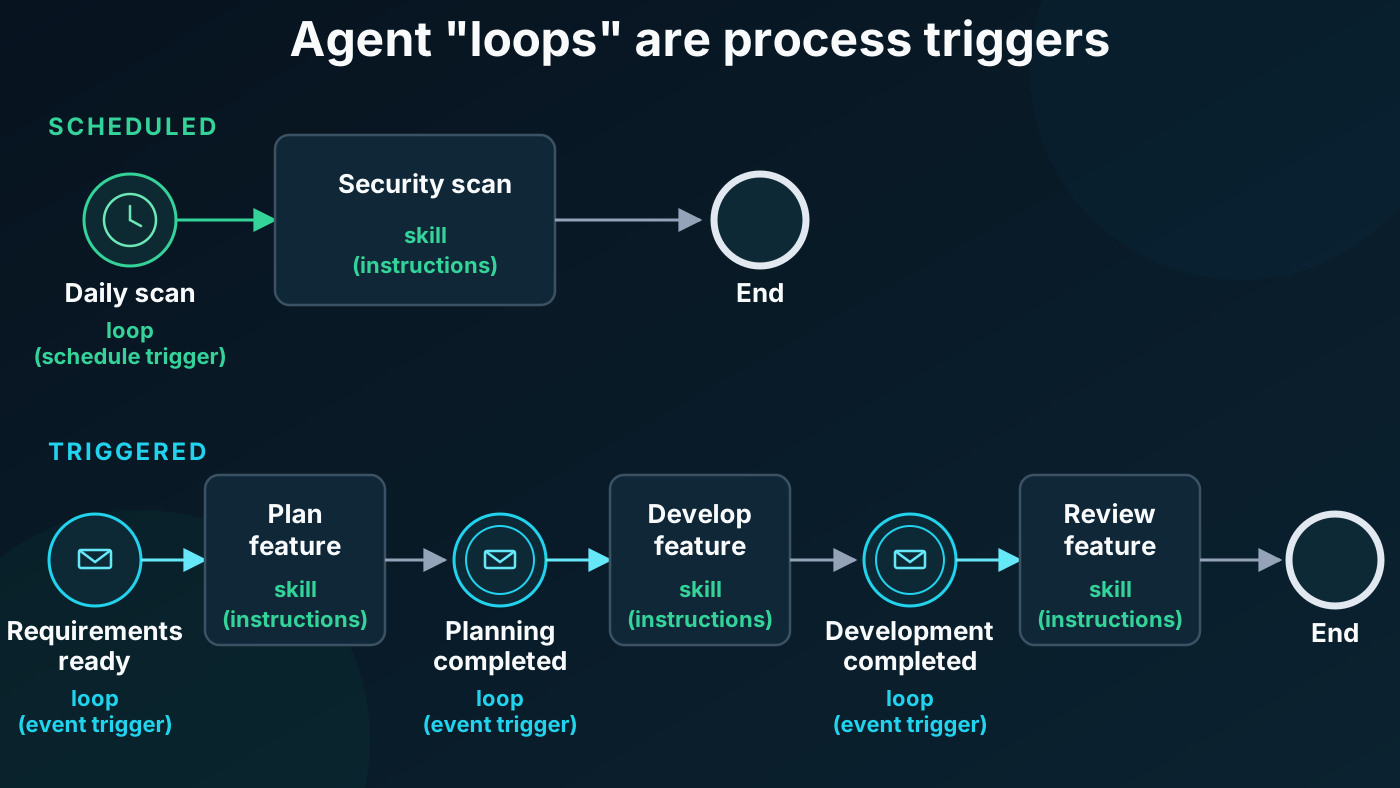
Scheduled automation
A scheduled trigger is the most straightforward example. A schedule might trigger a security scan every morning. The skill tells the agent which scanners to run, how to assess the findings, and where to report any problems.
Creating our automation can be very easy:
- The skill describes how to do the task: Defining one can be as easy as writing a few lines of instructions and saving them in a
SKILL.mdfile. - The trigger starts it: Creating one can also be as easy as typing
/loopin your chat and saying what should run and when.
Event-based automation
Task triggering does not have to be schedule-based; it can also respond to an event. Consider a simple software development lifecycle:
Requirements → Specification → Planning → Development → Testing → Review → Deployment
This is the process. Each stage contains tasks that might be completed by people, agents, or both.
For example, a ticket moving from planning to development is an event or change-of-state trigger that can start the development task. The skill is the reusable prompt that tells the agent how to complete that task. It might include understanding the specification, making the change, running the tests, and preparing the work for review.
In both cases, a trigger starts a defined process task.
Conclusion
The tools are new, and the possibilities are exciting, but process thinking isn’t. By unpacking the processes in our organisations, we can find opportunities to improve or automate them and use “loop engineering” and skills to put those changes into practice with agents.